Production tools Fusion does not have yet

Steel frame, weld and pipe routing add-ins for Fusion 360

Structural frames, weld beads, frame analysis, base plates, stock-bar planning, pipe routing, CNC bend data, press-brake bend sheets, coordinated hole series, linked fasteners, local backups of your cloud designs and a free measuring tool — focused Fusion workflows with the model context and downstream output the job actually needs.

7 add-ins
fabrication, assembly, backup
1,696+
profile, pipe & tube sizes
Rebuildable
edit after creation, everything follows
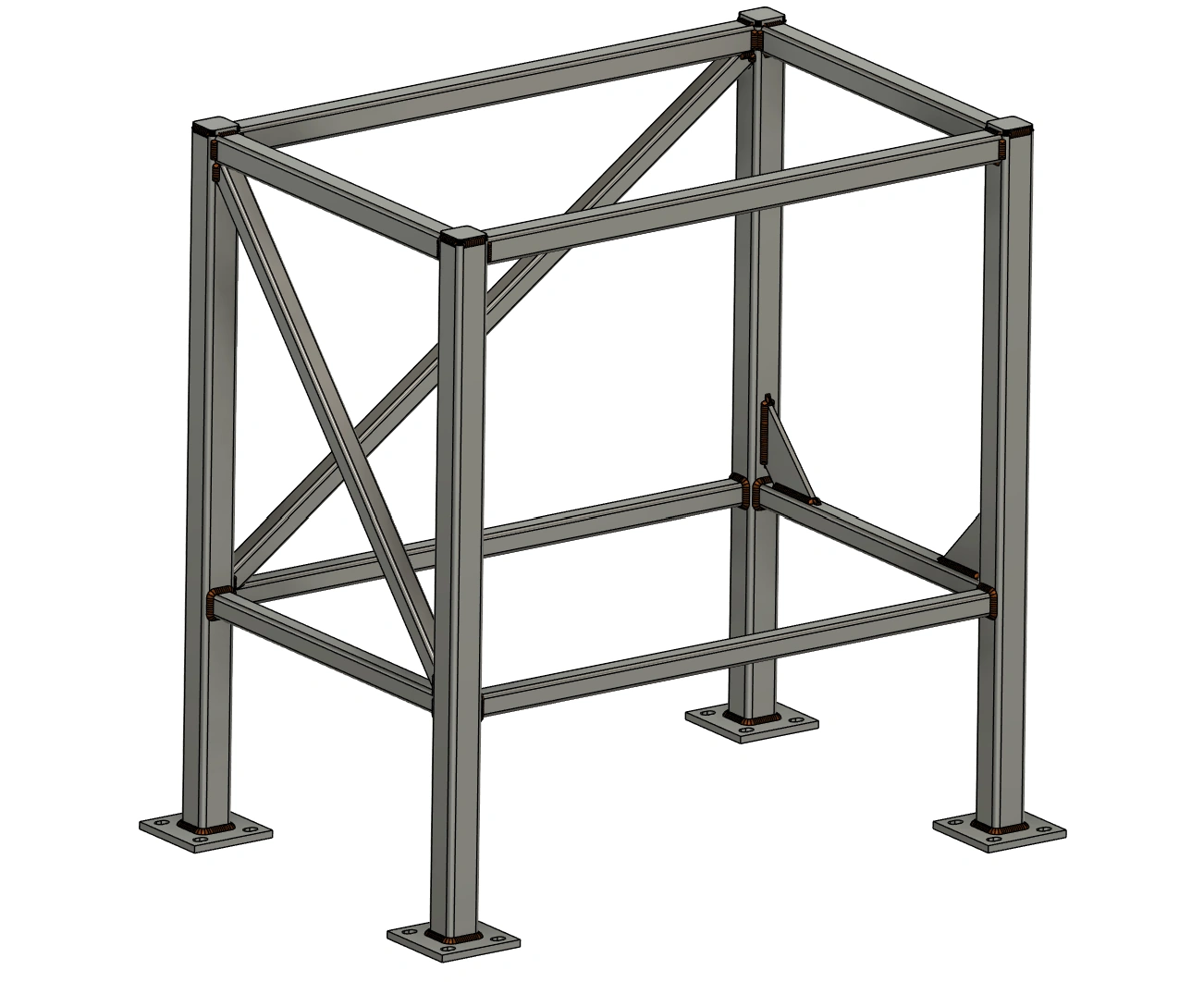
Fusion Frame command with coloured profile groups and editable frame settings

Steel Frame & Weldments

Editable steel frames

Build profile groups and revise their orientation and joints.

Products

Pick the part of the job you do

Every add-in runs inside Autodesk Fusion and keeps its working data local. They share one idea: the model should retain the context that production and downstream work need.

Flagship

On the App Store

Steel Frame & Weldments

Frames, joints and cut lists

Build steel and aluminium frames from centerline sketches with SolidWorks-style joint rules, add gussets, end caps and self-fixturing tab/slot joints on tubes and plates, and export cut sheets and plate DXFs.

  • 845 sizes — EN, ANSI, JIS, Indian IS, aluminium extrusion
  • Miter / butt / cope, corner override, weld gap
  • Gusset, End Cap, Notch, Trim, Tab / Slot for tubes and plates
  • CSV + PDF cut sheets with balloons, flat plate DXFs
$49/yror $8/month per user · free 3-day trial
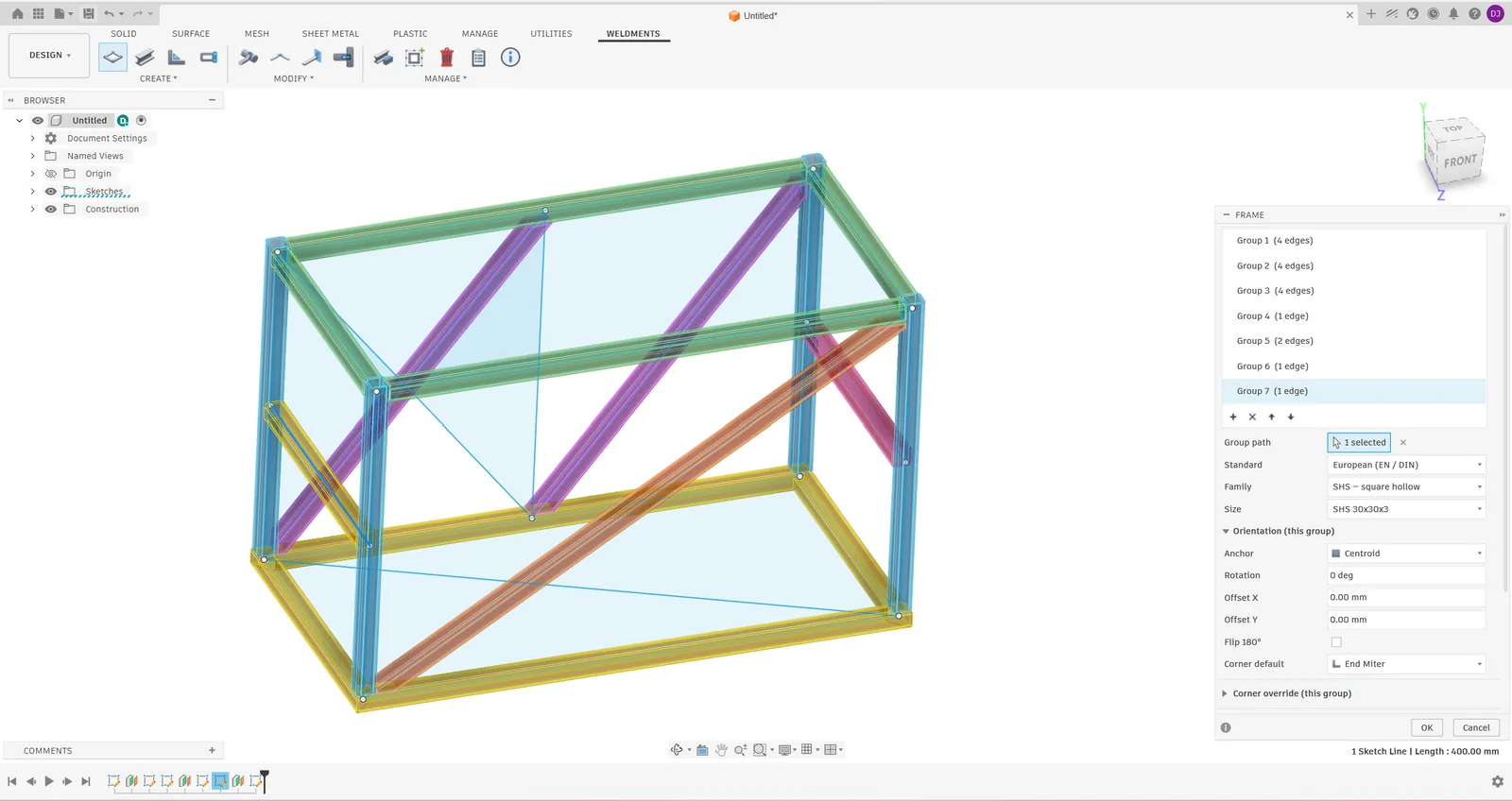
Frame command with several profile groups previewed in Fusion 360

More add-ins

Complete Weldments Pro steel frame with base plates, gussets and Rippled, Textured weld beads in Autodesk Fusion
On the App Store
Steel Frame & Weldments Pro add-in icon

Steel Frame & Weldments Pro

Tube folding, welds and frame analysis in Fusion

V-notch and fold a connected run from one tube, then export the straight blank. Model welds, analyse frames and prepare schedules, cost estimates, stock plans and fabrication files in the same Fusion project.

  • V-Notch & Fold: multi-direction tube folds, tab/slot, holes and lettering in the unfolded STEP
  • Fillet and groove welds, automatic groove measurement
  • Frame Check and Frame Studies: load cases, combinations, design versions
$89/yror $12/month per user · free 3-day trial
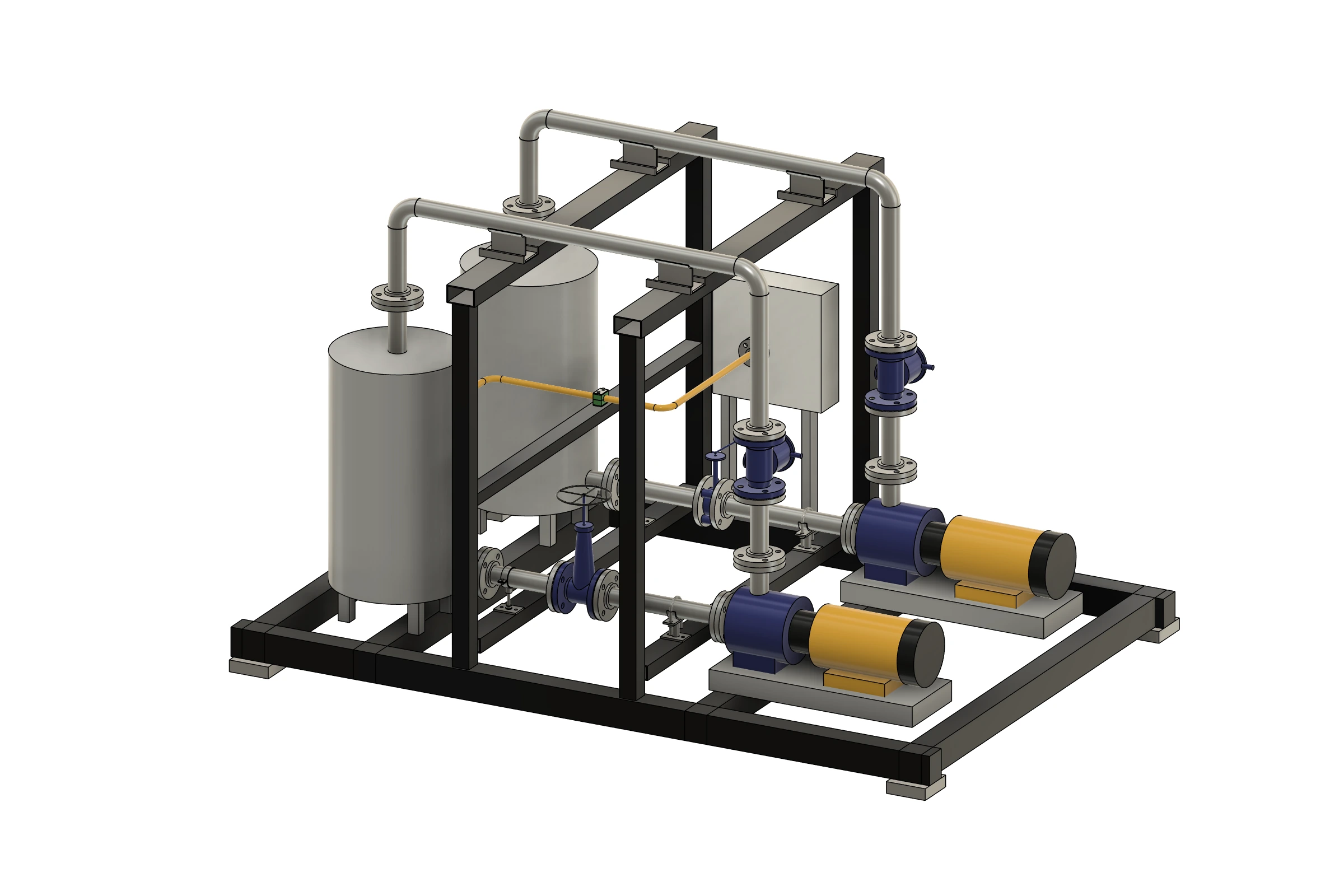
Ball valve, slip-on flanges and hollow pipe sections created in Autodesk Fusion
Available direct

Tube & Pipe Routing

From tube routes to fabrication packages

Build editable pipework from sketches or XYZ/LRA tables, add valves with mating flanges and prepare shop PDFs, STEP models and stock cutting plans in a revisioned fabrication package.

  • 851 stock sizes in 44 families
  • Editable routes, valve mating flanges and supports
  • XYZ/LRA input and imported STEP tube recognition
$49/yror $8/month per user · pay by card
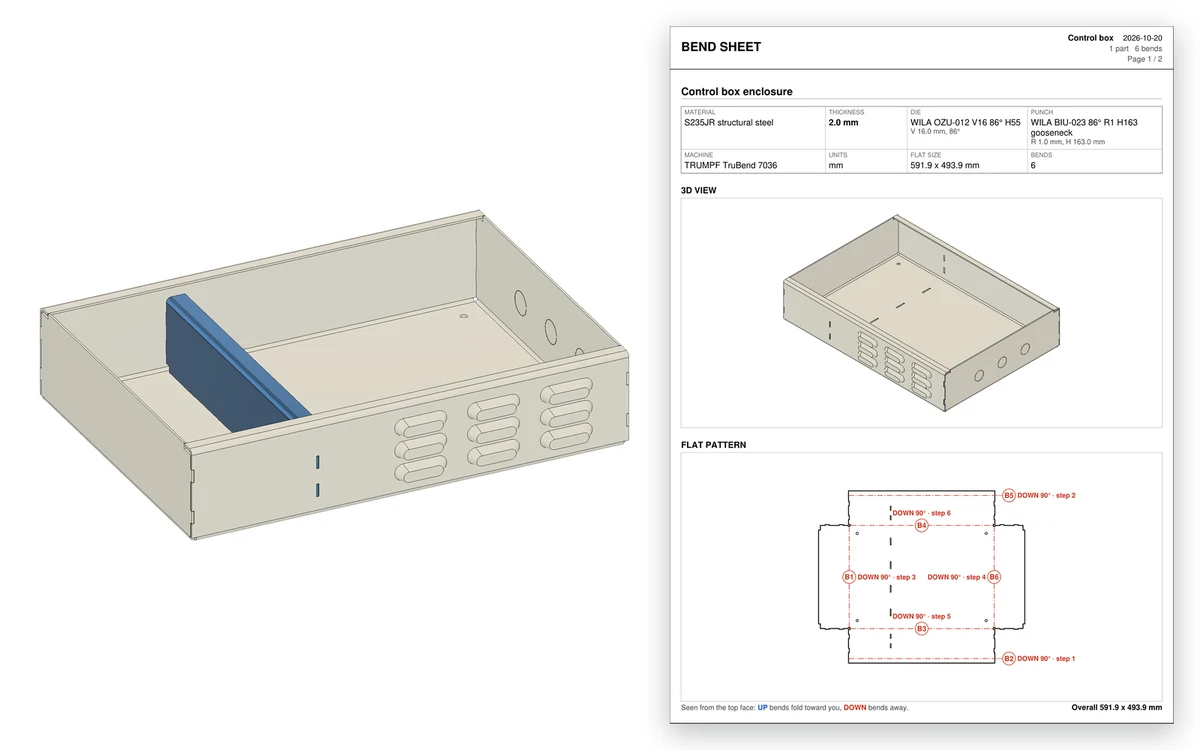
A sheet-metal enclosure from Autodesk Fusion next to page one of its bend sheet: the setup, a 3D picture of the part and the flat pattern with numbered bends
Available direct
Sheet Metal & Press Brake add-in icon

Sheet Metal & Press Brake

Bend sheets for the press brake, from the Fusion flat

Reads the Fusion flat pattern of a sheet-metal part and plans it for your press brake: bend order, back-gauge X and handling for every hit, the punch and die station from your sectioned tools, tool, force, section and 3D collision checks, and a bend sheet PDF, bend-program CSV and layered flat DXF. Bend rules come from your own dies and test bends. Forming tools add louvers, knockouts, beads and more, checked against the tool makers’ limits, with a punch-press plan checked hit by hit and shown in 3D, and Tab & Slot joints.

  • Bend order, back-gauge X and handling for every hit
  • Punch and die stations from your sectioned sets
  • Tool, force, section and 3D checks before the first hit
$89/yror $12/month per user · pay by card
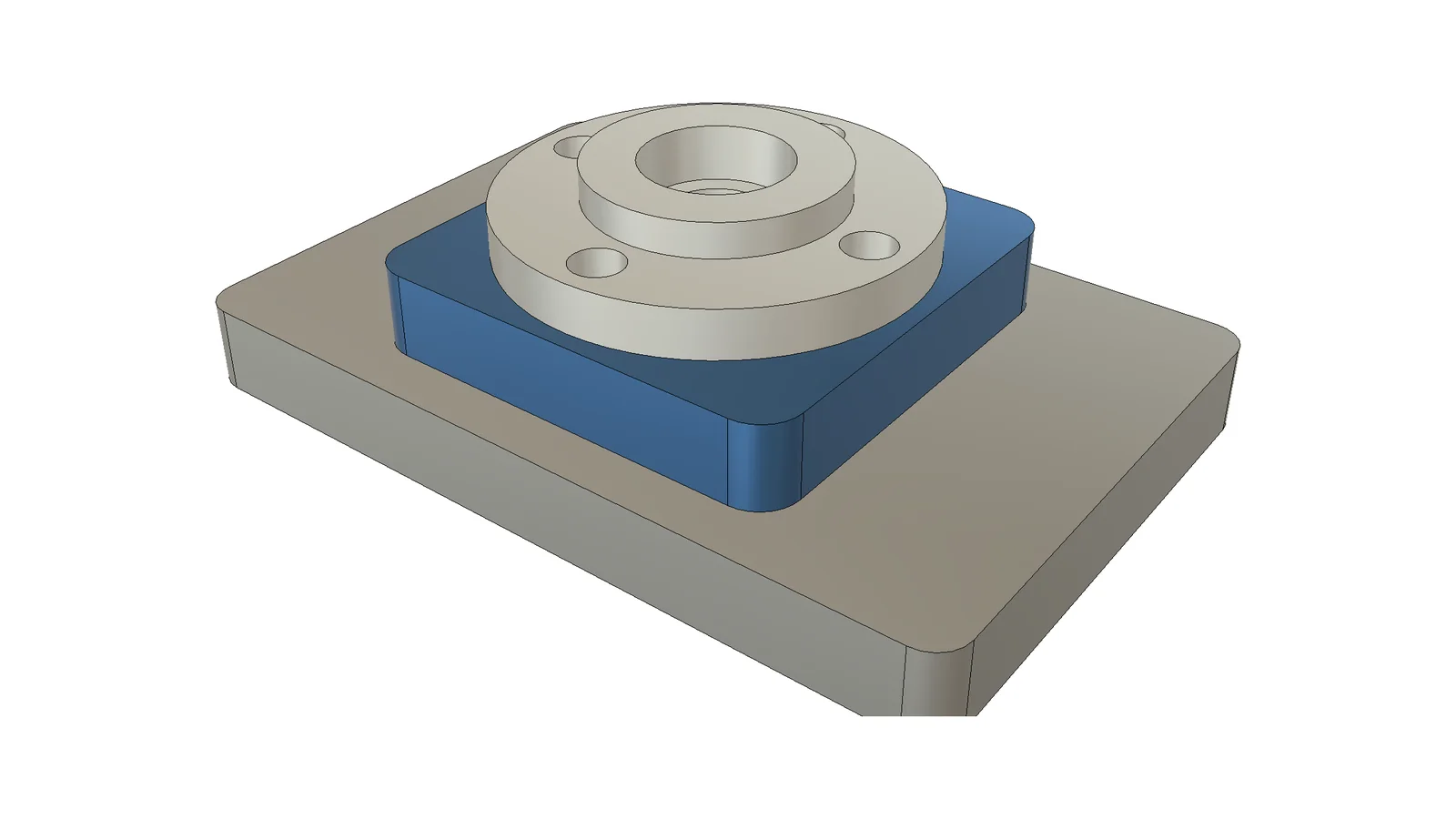
A bearing cover with counterbored holes on a spacer block and a base plate in Autodesk Fusion, three linked part files drilled from the assembly by Assembly Hole Series
Available direct
Assembly Hole Series add-in icon

Assembly Hole Series

Bolted-joint holes through every part, linked files too

Pick the hole centres or the face of a motor or rail, the parts to go through, and the screw and how the joint ends. Each part gets the hole for its side, sized to ISO and DIN, or the cut where a cutter crosses it. Separate linked part files are changed and saved for you, one edit changes them all, and the bolt list gives every screw its length.

  • One command drills every part, linked files too
  • Counterbores, sunk nuts and threads sized to ISO and DIN
  • Assembly Cut of any shape through several parts
$49/yror $8/month per user · pay by card
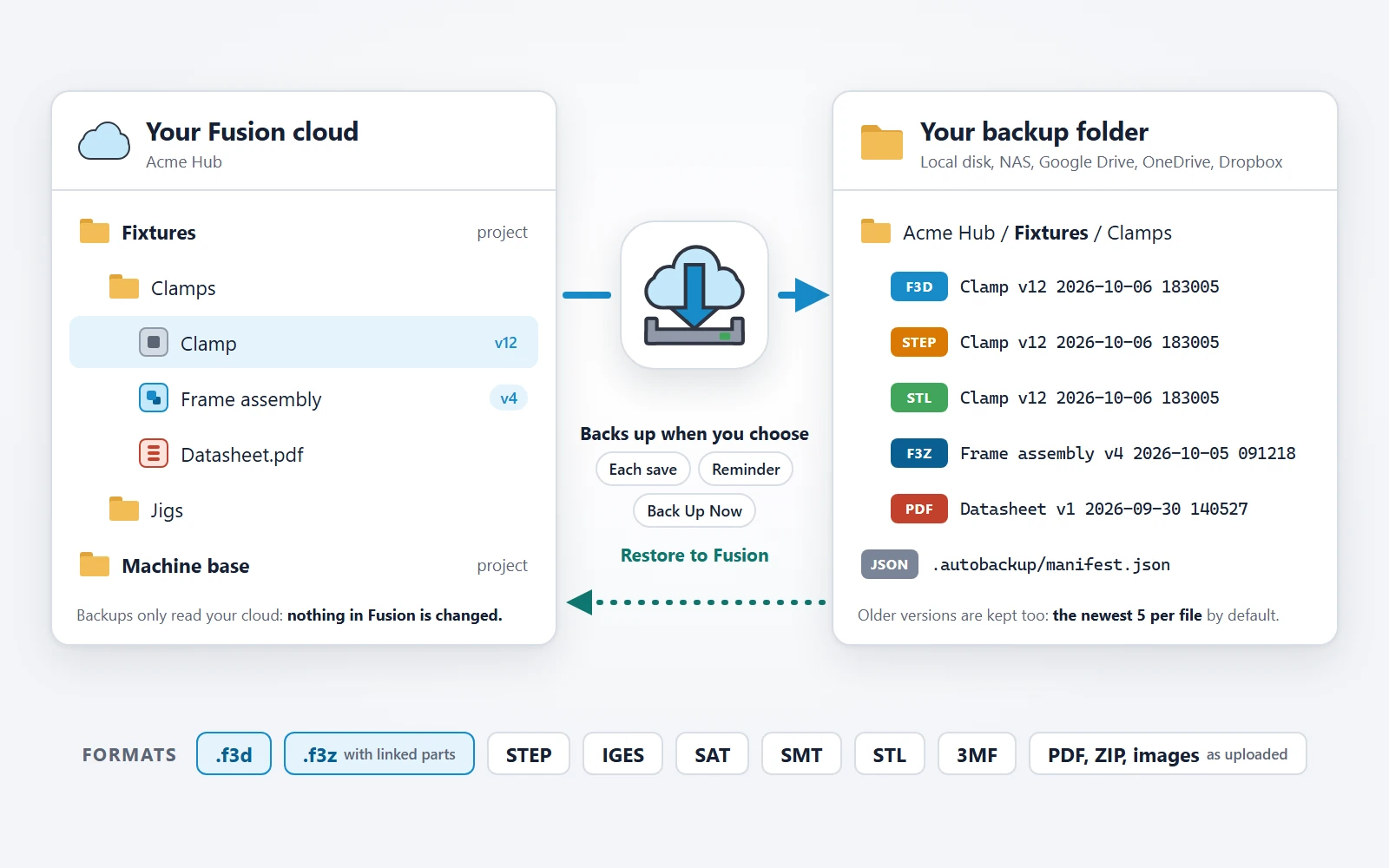
Illustration: a Fusion cloud project copied by Auto Backup & Export into a local backup folder as F3D, STEP, STL, F3Z and PDF files
Available direct
Auto Backup & Export add-in icon

Auto Backup & Export

Local backups of your Fusion cloud designs

A Fusion add-in that exports, downloads and files your cloud designs for you, instead of one by one: after each save, on a daily or weekly reminder or with Back Up Now. It works while Fusion is open, and Fusion is busy while it backs up or restores. Older versions are kept and can be restored into Fusion.

  • Every design exported and filed for you, version by version
  • Each save, a daily or weekly reminder, or Back Up Now
  • .f3d, .f3z with linked parts, STEP, IGES, SAT, SMT, STL, 3MF
$39/yror $7/month per user · pay by card
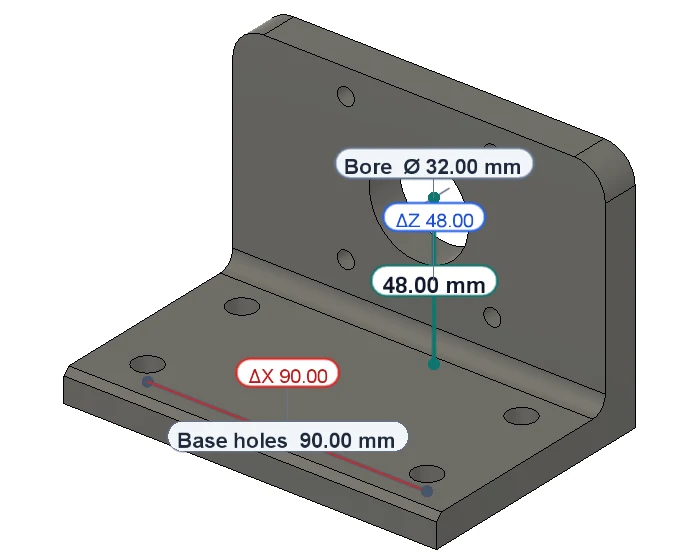
A motor bracket in Autodesk Fusion measured with Caliper: the bore centre 48.00 mm above the base with its Z part, and the saved Bore Ø 32.00 mm and Base holes 90.00 mm
Free
Caliper – Measure and Report add-in icon

Caliper – Measure and Report

Measure in Fusion, save the values, print a report

Measure points, edges, holes, faces and bodies with dimensions that stay readable on the model, save each value to a table that is still there in every design and after a restart, and export the table to CSV or a PDF report.

  • Hole to hole: centre, nearest or farthest edge
  • Distances with their X, Y and Z parts in colour
  • Labels that never overlap or hide behind the part
Freefree download · Windows and macOS

More Fusion workflows are in development.

Tell me what your shop needs →

Why these add-ins

Built the way a fabricator works, not the way a demo looks

Real joints, verified

Miters, butts and copes are cut with BRep booleans and every build is checked: a joint that did not close is reported, never hidden.

Welds you can count

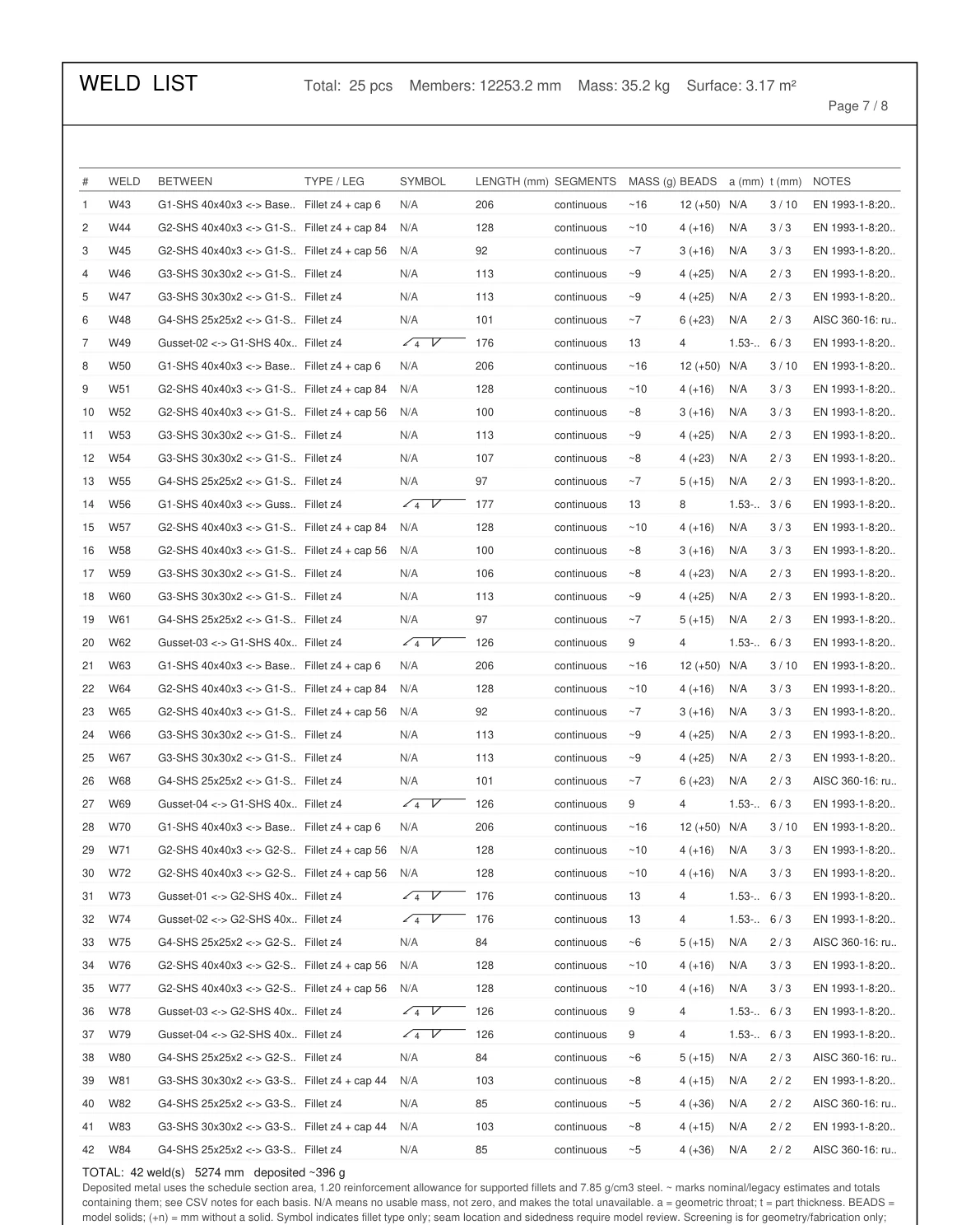
Weld beads on frames and plates, with a weld list of length, deposited mass and cost, and Frame Check for loads, stress and deflection.

Pipework with real fittings

Tees, crosses, reducers, elbows, flanges and valves from standard tables sit at the sketch nodes, and every tube is cut back to them.

Holes that line up

Assembly Hole Series drills a bolted joint into every linked part file in one command, sized to ISO and DIN, and exports a bolt list with standard lengths.

Shop-ready output

Cut sheets with balloons and saw angles, tube and press-brake bend sheets, plate DXFs, 1:1 notch templates, stock plans and one fabrication package.

Edits stay connected

Saved joints, plates, welds and fittings reapply after supported edits. Rebuild issues are reported for review; deleted items stay deleted.

Your designs stay yours

Designs are never sent to us; license checks send only your Autodesk ID, email and the App ID. Auto Backup & Export keeps your own copies.

One developer, direct line

Built and supported by one engineer. Reports go to the person who fixes them; most features started as someone’s email.

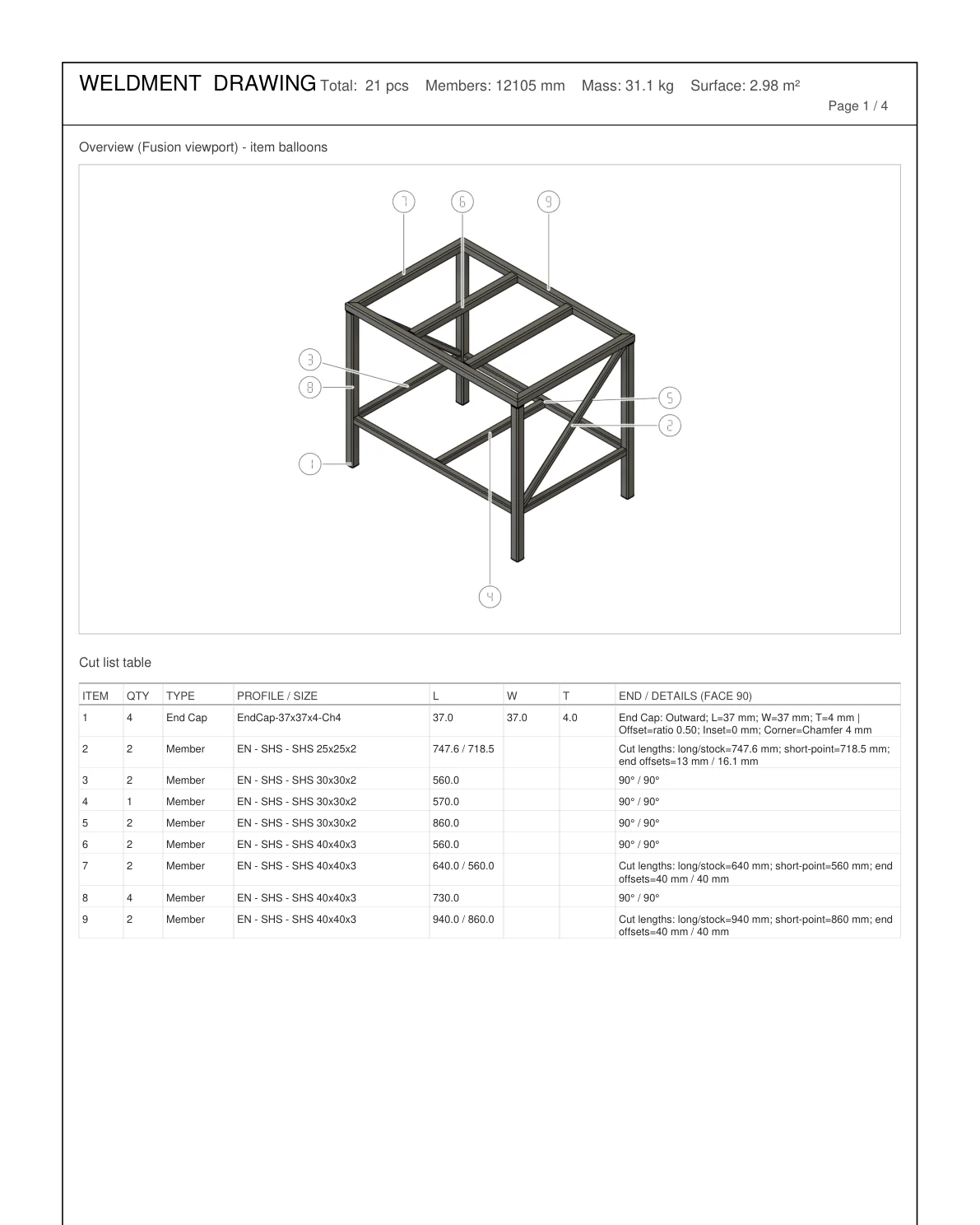
Weldment drawing PDF with the frame overview, item balloons and the cut list table
Cut sheet with model overview and balloons (Steel Frame & Weldments).
Weld list PDF with weld type, leg, length, deposited mass and beads per joint
Weld list with length, deposited mass and beads (Weldments Pro).
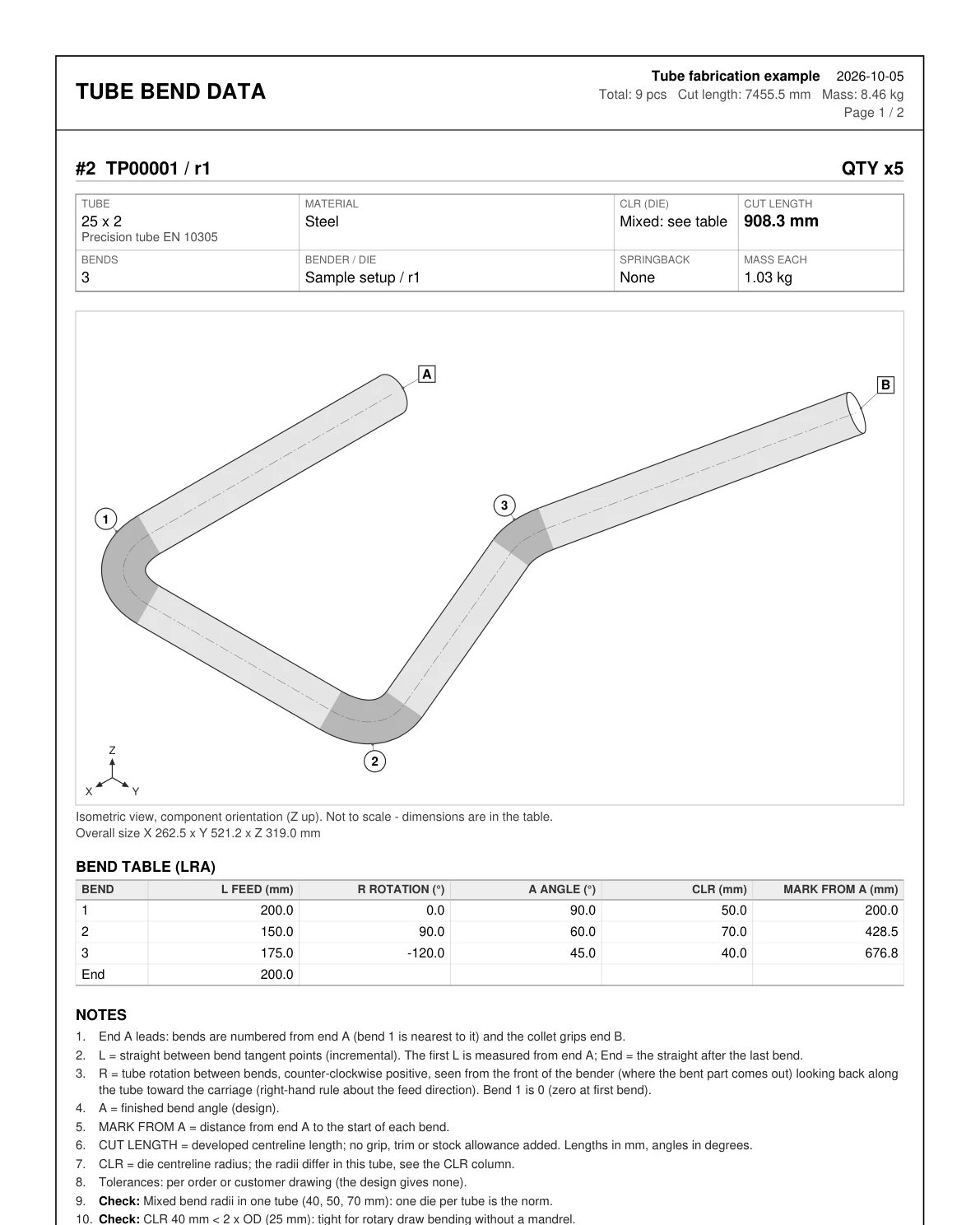
Tube bend data PDF with an isometric view of a bent tube, numbered bends and the LRA bend table
Bend sheet with an isometric view and the LRA table (Tube & Pipe Routing).

Buying and licensing

App Store and direct purchase options

Every paid add-in is a per-user subscription, monthly or yearly, and a free 3-day trial starts the first time you run it. Caliper – Measure and Report is free: download it on its page. Steel Frame & Weldments and Weldments Pro are on the Autodesk App Store, and Weldments Pro can also be bought by card on its own page. Tube & Pipe Routing, Sheet Metal & Press Brake and Auto Backup & Export are bought by card on their own pages while their App Store listings are in review. Assembly Hole Series goes by email — write and the build, license and installation details come back by reply.

Do the add-ins work together?

Yes. Steel Frame & Weldments Pro opens files made with Standard. Tube & Pipe Routing, Sheet Metal & Press Brake and Assembly Hole Series work in the same Fusion designs so frames, pipework, bent sheet-metal brackets and bolted joints stay together. Auto Backup & Export keeps a local copy of the designs you make with any of them, and the free Caliper measures in any of them and keeps the values in one table.

Can I move from Standard to Pro later?

Yes. Pro opens the same files, and with an active Standard license the Pro trial is 7 days instead of 3. On an annual Standard license you can upgrade by paying only the price difference for the time left in your term — check your own upgrade price on the Pro page. On a monthly plan, just start Pro at US$12 and switch back if Standard turns out to be enough.

Windows or Mac?

Every add-in runs on both. Steel Frame & Weldments, Weldments Pro, Tube & Pipe Routing, Sheet Metal & Press Brake and Assembly Hole Series ship a Windows bundle and a macOS bundle with every release, and the download section of each product page lets you choose. Auto Backup & Export is built for both as well, and Caliper is one free download for both.

Is there AI control?

Weldments ships a local MCP server so an approved AI client can read the design and create frames, plates, welds, stock plans and DXFs — loopback only, licensed use only.

Where do I report a bug?

The feedback form below, with the email your Fusion account uses, or support@vanthanbk.com.

Feedback

Found a bug? Missing a feature?

Say which add-in, which profile or size, what you expected and what happened. No sign-up — just the email your Fusion account uses, so the reply reaches you. A free trial counts.

Already sent feedback?

My Reports →
What is this about?
Which add-in?

0 / 4000

Files (optional)

Up to 3 screenshots (5 MB each), one Fusion file (.f3d or .f3z) and one short video (50 MB each). They are used only to look into this report and are deleted after 90 days.

Reports are open to licence holders and trial users. support@vanthanbk.com